

Table of Contents
Looking for an in-depth WPForms review?
Throughout the entire WordPress ecosystem, there has been a lot of hype about this plugin. There are millions of users worldwide using this relatively new WordPress form plugin. But why is there so much hype around a form plugin?
Don’t get us wrong. Picking a beginner-friendly form builder that meets your needs is super important. Lots of small businesses need great forms, but it’s super annoying to create one from scratch.
So, why is WPForms so highly recommended by hundreds of WordPress blogs and YouTube videos out there?
In this article, we’re going to put the plugin to the test and get to the bottom of these questions by exploring its newest features, AI capabilities, and how it pairs with the Xpro Elementor Addons ecosystem.
Let’s dive right in.
Introduction: What is WPForms?
Using WPForms, you can easily create online forms for your WordPress website. It’s the easiest-to-use contact form plugin available since it allows you to create smart forms in minutes without having to write any code.
For those who are looking for a quick overview of WPForms, here’s a quick look at what it offers. WPForms and Google Calendar have a lot to offer, but before we automate workflows and optimize schedules, we should learn more about what they can do on their own.
WordPress form-building plugin WPForms is beginner-friendly, yet loaded with features. One of the most popular plugins today, WPForms offers an intuitive drag-and-drop interface and a growing list of functions.
Setting up WPForms is super easy too.
Let’s take a quick look here.
3 Main Reasons: Why Do We Need WPForms?
1. Reduce Spam Emails
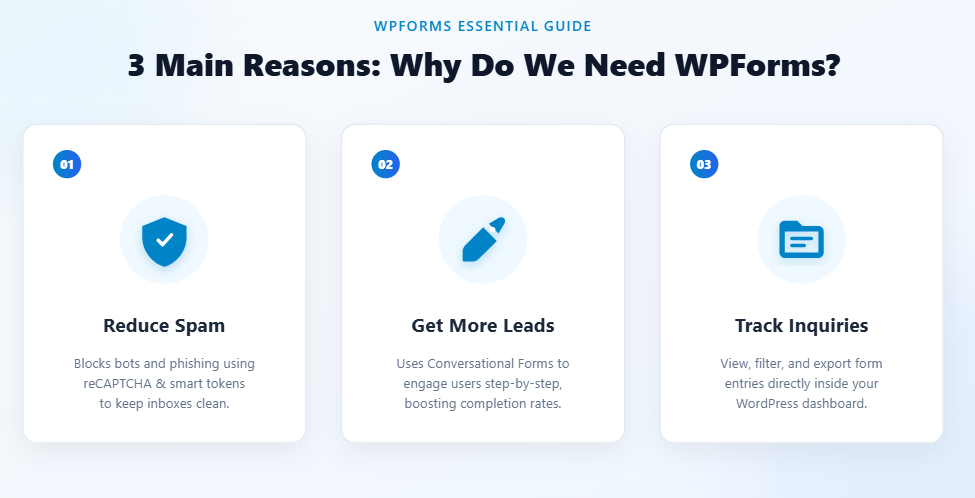
In the intro, we briefly mentioned that publishing your email address is a bad idea.
Why? Because spambots frequently scrape email addresses from websites.
In the event that a spambot intercepts your email address, it can wind up being added to all sorts of spam mailing lists on the internet in the very near future. Opening phishing emails or scams creates serious security risks. There is no doubt that contact forms cannot stop all types of spam from entering your inbox. Occasionally, you may be able to receive spam through the forms that are on your website. The good news is that you can easily tweak your form so that it does not happen.
For example, you can use a CAPTCHA in order to determine if the person visiting your website is human or not. It is important to keep your website free from spam and secure at all times. Check out our guide to stopping contact form spam for more details about how to stop spam bots from sending messages to your inbox. WPForms has many different anti-spam tools to stop spam bots from sending messages to your inbox.
2. Get More Leads
You may receive contacts from your website visitors for many different reasons. What are some of those reasons? In the case of owning your own business, you are definitely looking to increase the number of leads, and a contact form is a great way to do that.
Publishing a contact form can help you attract more customers by giving them an easy way to get in touch with you.
Your visitor is responsible for creating an email manually, which will require considerable effort on his or her part if you provide an email link only. Using a shared or public computer may prevent users from creating an email.
There is something about contact forms that makes them simpler and faster than other methods for generating leads. In addition, you can create a contact form that appears to have been created by a person using the Conversational Forms addon. Form conversion rates can really be boosted with conversational forms, as they display one question at a time.
3. Keep Track of Inquiries
As your business grows, you’ll receive more and more inquiries from your website. How will you remain competitive?
Additionally, your entries appear in the WordPress dashboard. As a reminder to check back later, you can start or mark an unread lead if you want to keep an eye on it. For any form, you can also turn on survey and poll reporting and export files in CSV format.
What’s New in 2026: All WPForms Features & AI Form Builders
WPForms has a number of features that make it one of the best forms plugins for WordPress. Also, it has evolved significantly, integrating next-generation technology to speed up site building and data collection:
- AI Form Builder: You can now generate complex, multi-field forms instantly using natural language prompts. Simply type what kind of form you need (e.g., “Build an event registration form with dietary preference checkboxes and a ticket quantity dropdown”), and the AI builds it for you in seconds.
- Advanced Form Templates Library: WPForms provides over pre-built, industry-specific form templates (such as order forms, donation forms, registration forms, and application forms) optimized for conversion right out of the box.
- Smart Conditional Logic: Create dynamic forms that show or hide fields based on user input, ensuring a clean, personalized experience.
- Multi-Page Forms & File Uploads: Break long forms into digestible steps with progress bars, and allow users to securely upload documents, media files, or avatars directly through submissions.

First and foremost, these features allow you to customize your website’s form to meet your needs. Aside from these basic features, this tool offers a lot more. Here are some examples:
- Guest post submission forms
- Email opt-in forms
- Surveys/polls
- Payment forms
- Registration/login forms
3 Best WPForms: Beyond Simple Contact Forms
To create a basic contact form, you can customize a lot of WordPress Plugins. However, WPForms is the best user-friendly form Builder, which I have discussed earlier in my article. With handling high competition, WPForms is the help that can go beyond just making Contact forms.
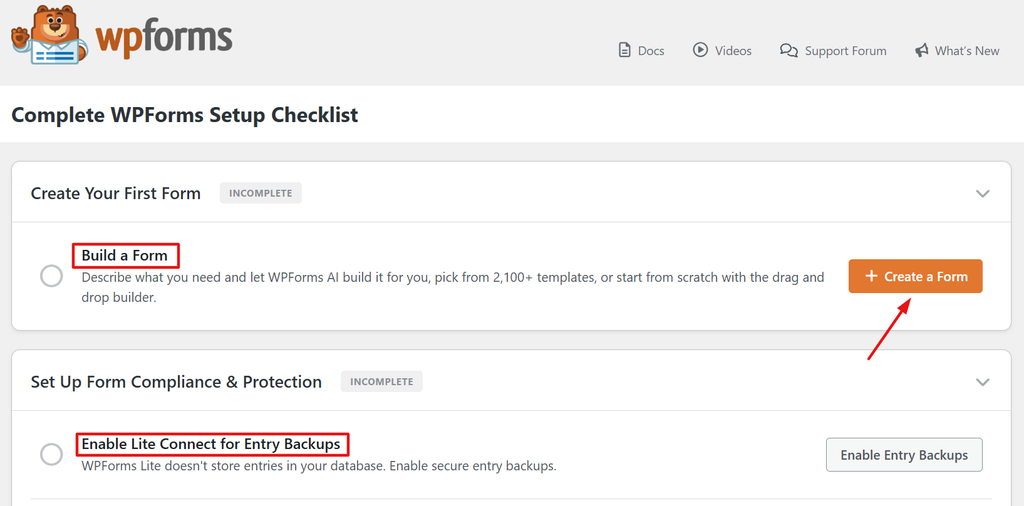
Regarding its features, here are some of the best WPForms examples that make your website look more aesthetic.
1. Create A Survey or A Poll To Engage Your Visitors
WPForms allows its users to personalize all features that are more than just contact forms. Simply create a survey form to engage your users. To collect feedback from your visitors, you can create detailed survey forms and simple multiple-choice polls using the Surveys and Polls addon.
2. Accept Payments as Part of A Form
In the modern era, payments are made instantly by using a payment form after checkout. In other words, every payment checkout is connected to a payment processor.
As a result, you can accept payments and donations using WPForms through Stripe or PayPal.
3. Create A Custom Login or Registration Form
It is common for individuals to want to customize the default login and registration forms provided by WordPress.
You may want to consider using the WPForms User Registration addon instead of restricting yourself to WordPress’ core functionality because it allows you to create your own login or registration forms that can be embedded anywhere on your site.
The cool part about this is that you are also able to collect additional information, such as a brief bio, in addition to displaying the forms anywhere.
WPForms Pro Unique Features
User Experience Encourages You to Use
Almost every meaningful interaction that happens on the web: to sign up a new subscriber, sell a product or service, initiate customer support or get feedback — is achieved via forms. So while they may not be the most exciting element to design, good form design is an extremely valuable skill to possess.
After going through a few different resources, I was able to compile a shortlist of the best practices that I found the most effective. However, keep in mind that forms are highly contextual elements — and exceptions to best practices are often required.
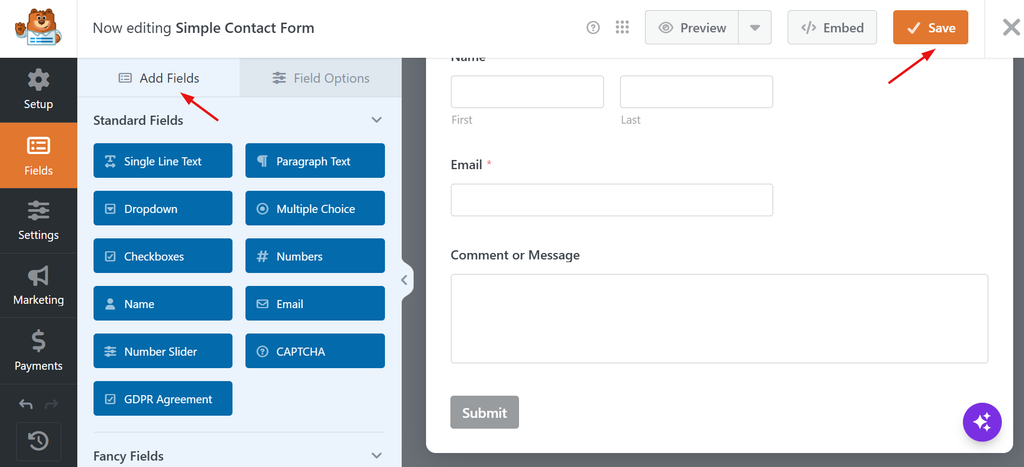
Before we begin, let’s quickly cover the five main components of a form:
- Structure: the layout of the form and the order of the individual fields.
- Input fields: interface elements such as text boxes, radio buttons, or checkboxes.
- Field labels: Descriptions for the corresponding input field.
- Action button: Gives the user the option of submitting their information or performing some other action.
- Feedback: Allows users to determine whether their submission was successful or not.
1. Form Pages for Distraction-Free Landing Pages
Is it possible for you to integrate a WordPress form into your website through Elementor? With the Elementor WPForms widget, you can easily create and edit forms on your site. Elementor’s page builder allows you to do all of this directly from within it.
The Form Pages allow you to create distraction-free, standalone landing pages for your forms with a single click, eliminating the need to build custom landing page templates in Elementor or Gutenberg.
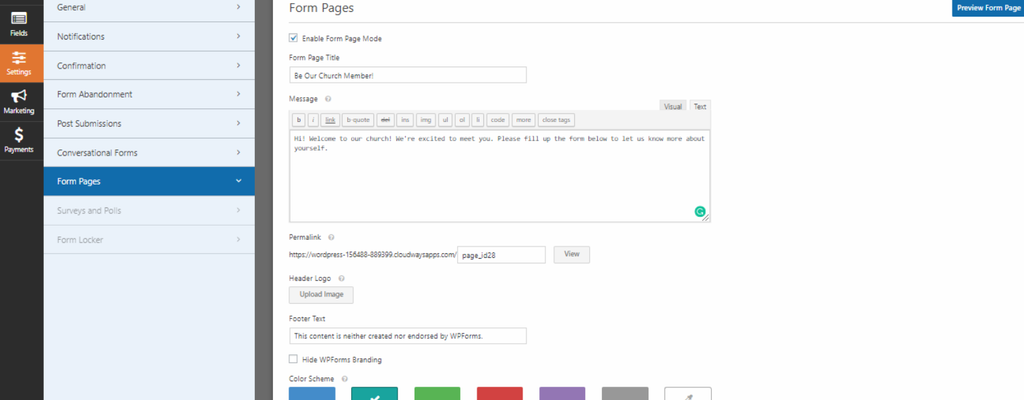
Once activated, additional customization controls appear directly within the settings panel. These options closely match the Conversational Forms setup, allowing you to seamlessly add a custom page title, insert a welcoming message, upload your company logo, and set your brand colors to maintain a cohesive visual identity.
At the bottom of the dashboard, you can select between two distinct layout aesthetics: a sleek Modern Design or a traditional Classic Design, giving you full control over your page’s presentation.
Note: Similar to Conversational Forms, dedicated Form Pages require custom URL structures to function correctly. Ensure your WordPress permalink settings are updated to any structure other than “Plain” (such as “Post name”) before launching your form page.
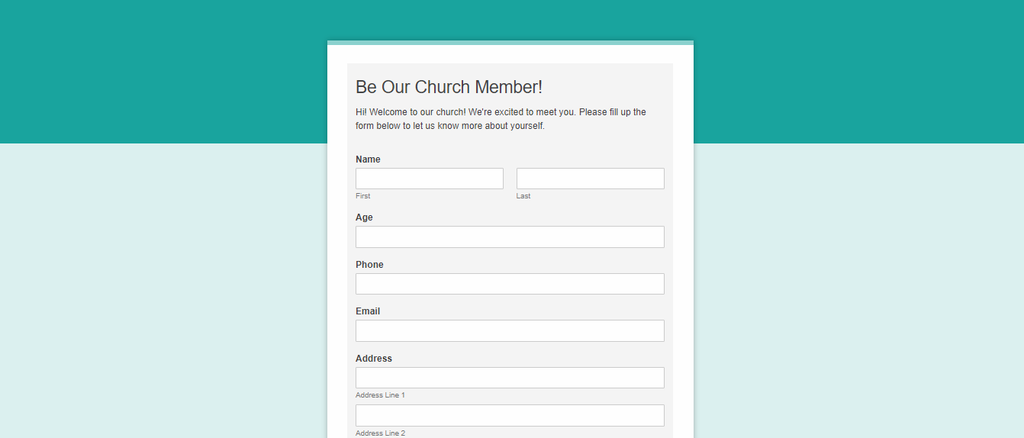
Here is an example of classic design:
2. Conversational Forms
Long forms are notorious for killing conversion rates. When visitors are greeted with dozens of fields all at once, the experience feels overwhelming and impersonal, leading to high form abandonment.
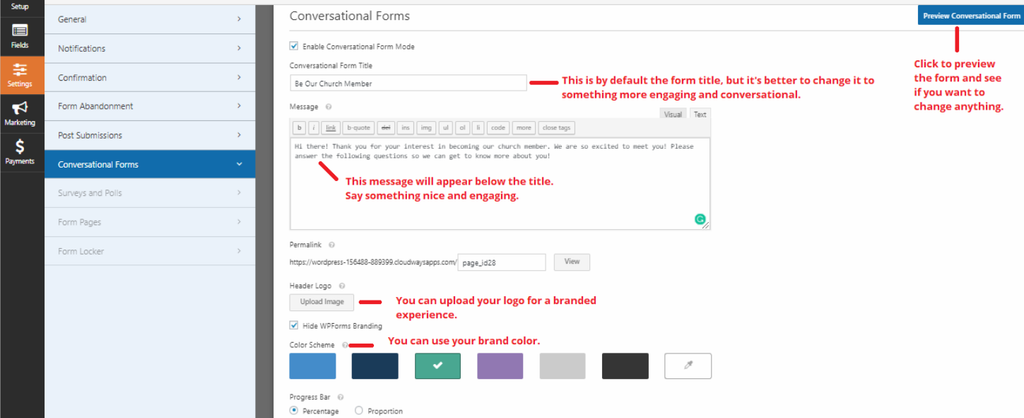
The Conversational Forms solves this by breaking down long forms into an interactive, step-by-step experience. By displaying just one question at a time, it mimics a natural face-to-face chat, making form completion feel effortless and boosting overall submission rates.
3. Conditional Logic for Dynamic Forms
Stop displaying one-size-fits-all forms. WPForms’ conditional logic makes your forms smart by dynamically showing or hiding fields based on real-time user selections.
Whether you want to tailor payment options, trigger newsletter opt-ins, or automatically qualify leads (e.g., showing high-tier project questions only to clients with budgets over $5,000), conditional logic keeps your forms clean, relevant, and conversion-focused.
Here is an example:

WPforms and Elementor forms Builder Price Comparison
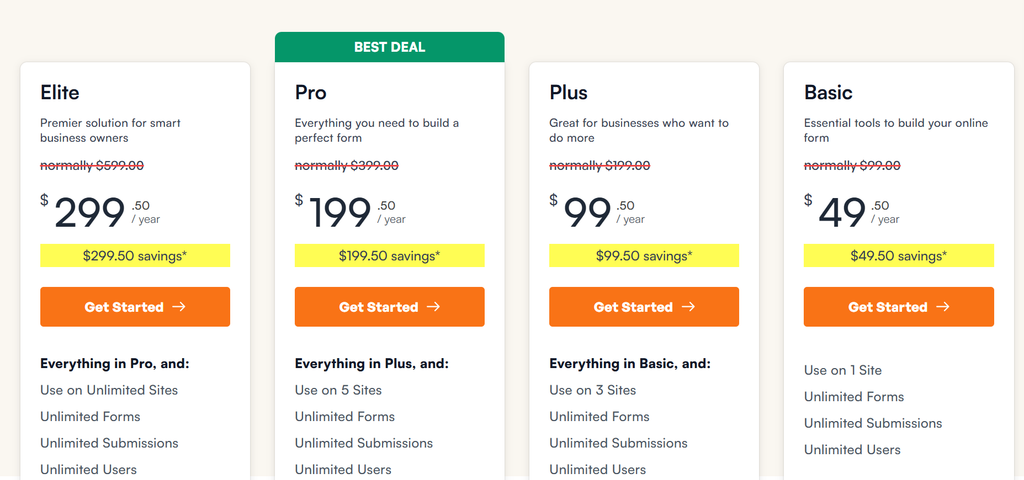
You can customize WPForms for free using elementor addons without purchasing the WPForms plugin. Download to create your contact form on your webpage right now from here.
WPForms: What I Like or Don’t!
WPForms is an exceptional form builder for WordPress, prized for its intuitive drag-and-drop builder, rich template library, and smart features like AI form generation and Conversational Forms. It makes launching high-converting contact and lead-capture forms effortless for beginners without requiring custom code.
However, its free version is heavily restricted on advanced functionalities, and the premium Pro plans carry a steep renewal price tag. Additionally, it lacks native multi-file uploading within a single field, and features like Form Pages require updating default permalink structures to work.
Despite minor limitations, it remains a top-tier form solution.
Final Verdict
Is WPForms the best WordPress form plugin?
The verdict is yes; however, with WPForms and the best elementor addons you can get more customization options.
Even with the Basic plan, you receive a tremendous amount of advanced features. Building and integrating a form on your site would cost a lot of money and take days if you had to custom-develop it.
To get the most value from your WordPress site, you should use the Xpro WPForms widget.
Also, if you want your site to make money, set up push notifications. Your traffic will increase, engagement will increase, and sales will increase automatically if you use push notifications.

